Skinning Houdini
La note
Skin / Capture
Skin capture - Houdini documentation
Lors du skinning (appelé plutôt capture dans Houdini), Houdini vient créer des tétrahèdres temporaires qui remplissent tout l'intérieur de la modé, ce qui permet de skinner par correspondance intérieur et pas selon la surface. Par exemple un point sur la jambe droite n'aura aucun risque d'être influencé par un joint de la jambe gauche car le chemin intérieur entre jambe gauche et droite est très long alors que les points sont très proches en surface
Le skinning se fait principalement via le node jointcapturebiharmonics (skinning automatique) et le jointcapturepaint (correction ou création manuelle du skinning)
Setup de base avec le jointcapturebiharmonics :
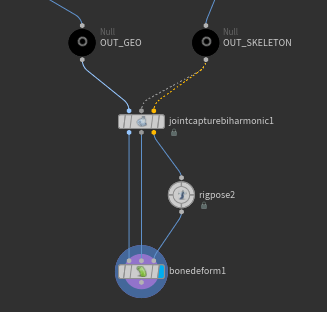
ou encore plus simple :

Le rig pose et le bone deform sont là pour tester les déformations du skin. Pour animer, il est largement préférable d'utiliser le framework APEX
Les principaux nodes de skinning
| Create Capture Weights | Description |
|---|---|
| Joint Capture Biharmonic SOP | Creates smoothed-out capture weights based on joint position and volume. Works well for softer, non-mechanical, organic deformation. |
| Joint Capture Proximity SOP | Creates capture weights based on the geometry’s distance to the skeleton joints. This is a quicker and less computationally-intensive operation than the Joint Capture Biharmonic SOP, but results in weights that are not as evenly distributed or smoothed out, especially for organic surfaces. The Joint Capture Proximity SOP works well for rigging simple geometry like a tube. |
| Capture Packed Geometry SOP | This is a rigid weighting method where geometry pieces are assigned to a given joint with 100% weighting. |
| Joint Capture Paint SOP | Allows you to interactively paint capture weights on geometry. |
| Modify Capture Weights | Description |
|---|---|
| Attach Joint Geometry SOP | Attaches geometry to joints, with the geometry influencing the capture result. |
| Joint Capture Paint SOP | Allows you to interactively paint capture weights on geometry that have existing weights. |
Références
Houdini KineFX 101: Attach Object To Rig // Capture Packed Geometry - YouTube
...